
Model name
Seedream 5.0 Pro
ByteDance Seed names the image model Seedream 5.0 Pro.
Seedream 5.0
Free online image tool
Use Seedream 5.0 Pro online to plan free image prompts for dense infographics, precise edits, realistic photos, layered assets, and multilingual image ideas with no sign-up. Start from the model strengths ByteDance highlights, then turn them into practical prompts, examples, use cases, and next-step image workflows with fewer creative limits and no restrictions on exploring ideas.
Model strengths
Start from Seedream 5.0 Pro strengths, then turn them into prompts for dense layouts, precise edits, realistic photos, and multilingual concepts.
Seedream 5.0 Pro
ByteDance Seed names the image model Seedream 5.0 Pro.
Multimodal image generation
Seedream 5.0 Pro focuses on advanced image generation and professional content creation.
Dense, editable, realistic visuals
Use it for high-density infographics, interactive editing, photographic quality, and multilingual generation.
Production planning before final review
Use it for complex visual briefs where layout, labels, texture, and multilingual prompt control matter.
Core features
Use these five capability areas to create stronger prompts for a free online Seedream 5.0 Pro image workflow with fewer creative restrictions.
Create visuals where charts, labels, dimensions, callouts, and multiple views stay readable in one composition.
Seedream 5.0 Pro is positioned for high-density infographics and information-heavy image generation.
Input: a blueprint, UI, data, or technical prompt. Output: a structured image with dense visual information.
Iterate a visual with exact changes instead of rewriting the entire image brief from scratch.
The official model page highlights interactive editing as a core Seedream 5.0 Pro capability.
Input: an existing image plus a targeted edit request. Output: a revised image that preserves the intended scene.
Plan assets as independent visual parts so designers can reason about foreground, objects, labels, and background.
For production prompts, describe separable layers such as subject, annotations, panels, props, lighting, and background.
Input: a layered brief. Output: a cleaner image concept with parts that can be inspected or revised separately.
Generate realistic people, interiors, lighting, materials, and camera-like scenes for human-centered concepts.
ByteDance Seed positions photographic visual quality as one of the main Seedream 5.0 Pro showcase areas.
Input: a realistic photography prompt. Output: a natural image with believable texture, skin, light, and environment.
Write prompts in different languages while keeping the visual task clear for international creative work.
The official page highlights native multilingual generation rather than English-only prompt assumptions.
Input: a multilingual or localized prompt. Output: a visual concept guided by the language of the brief.
Example prompts
Browse example prompts for free before opening the image workspace. Each example pairs a visual asset with prompt structure and review details.
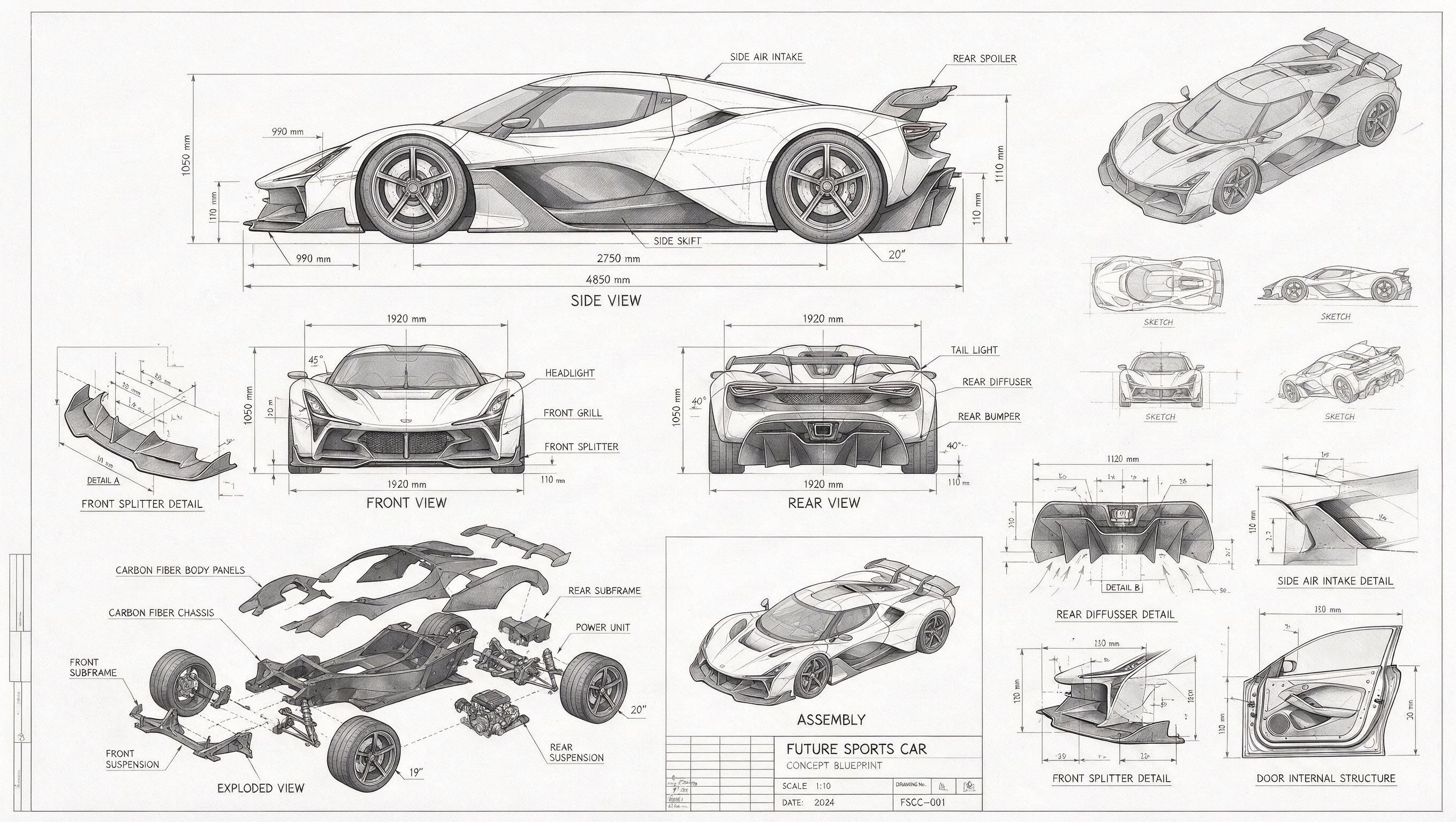
This example shows the high-density information use case: multiple vehicle views, part breakdowns, measurements, labels, and thumbnails remain visible in one blueprint-style composition.
Prompt structure
Futuristic sports car technical blueprint, grayscale draft relationship, front, side, rear line-art views, exploded parts, assembly diagram, component construction drawings, many measurement values, callout lines, loose thumbnails from different angles.
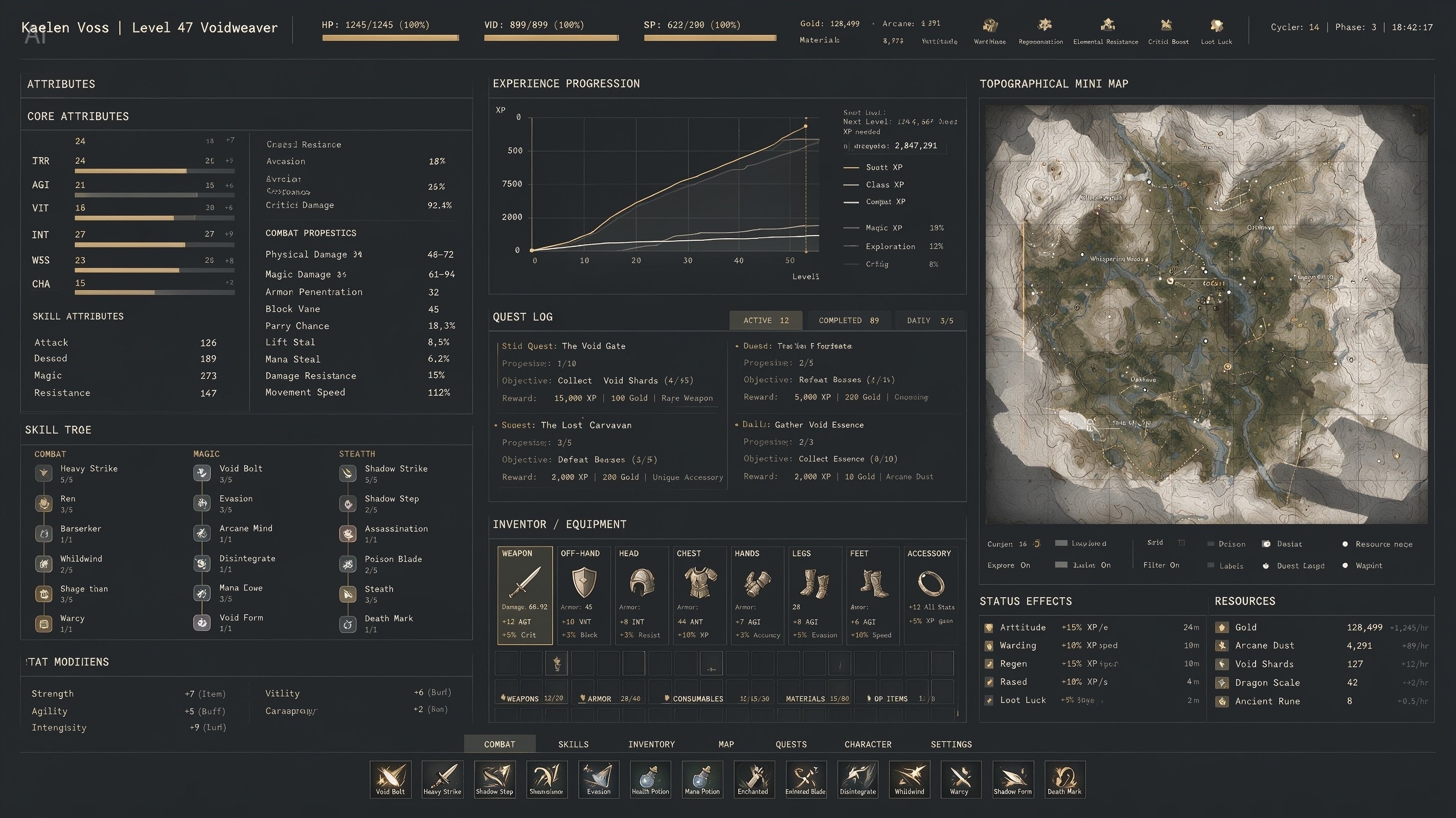
This example demonstrates dense UI and dashboard-style composition where panels, charts, status effects, inventory, and map information need consistent spacing and visual hierarchy.
Prompt structure
An extremely complex, high-information RPG character interface with dense character stats, experience-growth line charts, a huge terrain mini map, premium industrial functionalism, matte slate background, crisp white monospace font, restrained low-saturation gold, 1px grid lines, rich details.

This example focuses on photographic visual quality: believable skin texture, soft room light, natural domestic detail, and an everyday family-life scene.
Prompt structure
Realistic family-life photography. A Black father sits on the living room carpet, combing his young daughter's hair. The father wears a simple white T-shirt and sweatpants, focused expression. The daughter sits on a small stool, wrapped in a towel and holding a toy, warm natural window light.
How to use
A good Seedream 5.0 Pro prompt starts with structure, then adds style, edit intent, language, and review criteria before you generate.
Decide whether the image is a dense infographic, an editable design pass, a layered production asset, a realistic photo, or a multilingual creative concept.
Put the subject, layout, panels, labels, measurements, camera angle, lighting, and output format before mood words. Seedream 5.0 Pro works best when the brief is explicit.
For editing workflows, use a rights-cleared image or describe the reference structure clearly. Keep edit instructions targeted so the model can preserve the important parts.
Inspect text labels, hands, faces, object geometry, maps, charts, and small annotations. Dense images often need a second pass for production accuracy.
Model fit
Use this table to decide whether the Seedream 5.0 Pro prompt path, an available Seedream workflow, or another image model is the better next step.
| Model | Best for | Strengths | Limits |
|---|---|---|---|
| Seedream 5.0 Pro | Dense infographics, precise edits, layered image planning, realistic photos, and multilingual prompt workflows. | Officially positioned around multimodal generation, advanced reasoning, efficient content creation, and professional production. | Public production use still needs careful review of text, small labels, hands, faces, geometry, rights, and brand-sensitive details. |
| Seedream 4.5 | Current in-app Seedream generation and editing workflows when a stable available model is needed. | Works inside this app today with text-to-image and image-edit controls. | Use 5.0 Pro guidance when you specifically want the latest official Seedream Pro positioning. |
| GPT Image 2 | Broad image generation with strong prompt following and high-resolution review options. | Useful when prompt detail and multi-resolution control are the priority. | Choose Seedream 5.0 Pro when the project centers on ByteDance Seed's dense layout and multilingual strengths. |
| Nano Banana Pro | High-quality general image generation and reference-guided creative exploration. | Strong general visual ideation and high-resolution options. | Seedream 5.0 Pro is the clearer fit when your prompt depends on ByteDance Seedream strengths. |
Use cases
These use cases translate the official capability areas into practical creative jobs you can plan online before spending credits.
A vehicle, product, or hard-surface concept artist starts with a dense technical brief.
Blueprint prompt with front, side, rear, exploded, and detail views.
Use Seedream 5.0 Pro to produce one information-rich visual board, then review measurements, labels, and component relationships.
A technical concept sheet that can guide modeling, art direction, or a later manual drafting pass.
seedream 5.0 pro blueprint prompt
A UI designer needs a complex interface concept with many readable systems.
Dense RPG, SaaS dashboard, map, chart, and inventory layout instructions.
Prompt panel hierarchy, typography, grid line rules, color restraint, charts, and navigation zones explicitly.
A high-density interface mockup for moodboarding, feature discovery, or visual direction.
high density ai ui image generation
A marketer, photographer, or art director needs realistic human-centered imagery.
A natural scene prompt with identity, clothing, room, props, lens, and light direction.
Use the model for photorealistic composition planning, then review faces, hands, fabric, and environmental detail.
A realistic lifestyle visual suitable for concept review before final publishing checks.
seedream 5.0 pro realistic photography prompt
Boundaries
Read examples and plan prompts without signing up. Dense and realistic image outputs still need human review before public use.
Use ByteDance Seedream 5.0 Pro strengths when choosing prompts for dense, editable, realistic, or multilingual images.
Do not treat complex charts, tiny UI text, legal labels, or measurements as final without human review.
Interactive editing quality depends on a clear source image and a narrow edit request.
Layer separation should be written into the prompt as production structure; it is not a replacement for a design file with editable PSD or Figma layers.
For realistic people, review likeness, skin texture, hands, hair, and consent-sensitive use before publishing.
For multilingual prompts, keep layout terms, names, and labels explicit so the generated image does not mix languages unintentionally.
Use Grok Imagine for prompt planning and image workflows, and ByteDance Seed for provider announcements and policy details.
Next workflow
Choose the next workflow when you are ready to generate, edit, or animate a Seedream-style asset.
Use this workflow when you want to bring a reference image into an editing pass.
Open workflowUse this workflow when you want to start from a prompt-only image brief.
Open workflowUse this workflow after a Seedream-style still image is ready to animate.
Open workflowFAQ
Short answers about the model name, strengths, multilingual support, blueprint prompts, and ByteDance Seedream relationship.
Seedream 5.0 Pro is ByteDance Seed's advanced image generation model. The official page presents it for multimodal image generation, advanced reasoning, efficient content creation, and professional production.
Seedream 5.0 Pro is best suited for dense infographics, interactive editing, realistic image quality, layered production planning, and native multilingual generation. It is especially useful when an image must carry many details without losing structure.
Yes, the model is a strong fit for blueprint-style prompts when the brief names views, labels, callouts, measurements, exploded parts, and grayscale relationships. Always inspect small text and dimensions before using the output as production reference.
The official Seedream 5.0 Pro page highlights native multilingual generation. For best results, keep the subject, layout, labels, and output language explicit in the prompt.
No. Grok Imagine is an independent creative workspace. For provider announcements and policy details, check ByteDance Seed; for prompt planning and image workflows, use Grok Imagine.
Free online Seedream 5.0 Pro tool