
One scene on each line
The bulk video generator reads one non-empty line as one clip. Blank lines are ignored, and the counter stops at 8 so a long paste cannot silently turn into a larger spend.
Output: Up to 8 separate text-to-video jobs
Queue
Open historyQueued clips appear here, one row for each prompt line.
More video tools
Leave the queue when the next job needs one clip, a still, a longer ending, or a larger frame.
Quick answer
Updated October 9, 2026
A bulk video generator queues separate short clips from a list of scene prompts. You paste one scene on each line, choose one model and format, and send the list through the same text-to-video path used for a single clip.
Use this bulk video generator when the scenes share a format but the words change. It fits hook tests, a small product set, or a storyboard pass. It does not turn a spreadsheet into finished ads, and it does not render 50 videos at once.
The default bulk video generator queue uses Grok Imagine, one shared aspect ratio of 9:16, 6 seconds, 480p, and audio off. The credit estimate is 60 credits for one clip and 480 credits for 8 clips. Grok Imagine text-to-video durations run from 6 to 30 seconds. Each line needs at least 5 characters. Sequential generation submits one line, then the next, and each result stays a separate MP4.
The examples below show single clips, not a finished bulk video generator export. They are existing text-to-video drafts on this site. Watch the subject, camera move, and framing, then write prompts that ask for one comparable action per line.

Product motion from one written scene
Text prompt, product motion, existing site example
This perfume clip is an existing single text-to-video example, not an 8-clip bulk video generator export.
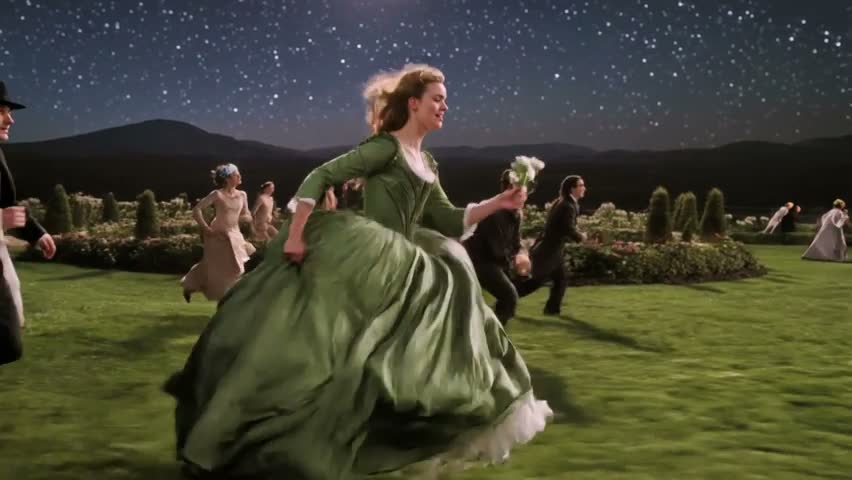
Creator motion from one written scene
Text prompt, creator motion, existing site example
This creator clip is an existing single text-to-video example, not an 8-clip bulk video generator export. Use it to judge motion and framing before spending credits on related prompts.
The controls are the same decisions you would make for one clip, applied to every line. That is useful when you are comparing language. It is the wrong tool when each scene needs its own model, length, or picture size.
The bulk video generator reads one non-empty line as one clip. Blank lines are ignored, and the counter stops at 8 so a long paste cannot silently turn into a larger spend.
Output: Up to 8 separate text-to-video jobs
Shared settings keep the bulk video generator from changing ratio halfway through a run. Every row uses the model, aspect ratio, duration, resolution, and mode selected before you queue.
Output: Matched format across the batch
The credit line shows what the bulk video generator will spend before the first submit. The total is the single-clip price multiplied by the number of prompts, with audio left off.
Output: Unit cost and run cost
Each row keeps its own status, error, and player. A blocked prompt does not hide the clips that already started, and a finished file stays attached to the line that created it.
Output: Per-row pending, failed, or playable result
A strong row can go to History, the video page, the extender, or the upscaler. Weak rows stay as prompt text so you can edit the line and queue a smaller follow-up run.
Output: One clip ready for the next tool
Treat the list like a shot list. If a line could mean two different shots, split it before you pay for it. A clear line names who or what appears, what moves, and how the camera behaves.
Paste the scenes into the bulk video generator, then check the row count. Each line needs a subject, an action, and enough context to stand alone.
Choose the model, ratio, duration, and resolution before spending credits. Use 9:16 for a short-form set or 16:9 for a wide set, not a mix inside one run.
Compare the unit price with the full run. If the balance is short, change duration or resolution, or delete lines, before the queue starts.
The bulk video generator submits one clip, then the next, using the same settings. Play each result before you download it or send it to another tool.
Keep one setup when the bulk video generator is comparing language, not format. A longer duration raises the credit cost of every row. Change the format only by starting a new run.
| Choice | Use it when | Avoid it when |
|---|---|---|
| 9:16 for every row | Use 9:16 for every bulk video generator row when the set is for Shorts, Reels, or TikTok. | Avoid 9:16 when the comparison depends on another frame shape. |
| 16:9 for every row | Use 16:9 for every bulk video generator row when comparing camera lines for a landscape edit. | Avoid 16:9 when the run needs a wide master for a site hero or presentation. |
| 480p draft | Use a 480p bulk video generator draft to judge motion and framing before a sharper rerun. | Avoid 720p when the test is only about wording. |
| Shortest useful duration | Use the shortest useful duration for every bulk video generator row when the action reads in a few seconds. | Avoid a longer duration when the idea only needs a short hook. |
| 480p instead of 720p | Use 480p for a 6-second bulk video generator row when the credit estimate should stay at 60 credits. The same clip at 720p costs 110 credits. | Avoid 480p when the approved clip needs the sharper 720p pass. |
These jobs fit a bulk video generator because the format stays still. If the winning idea needs a fixed first frame, move that one image to image-to-video instead of forcing the whole list through text.
This bulk video generator does not import CSV files or render 50 videos at once. The cap is intentional: eight lines is enough to compare a set, and it is small enough to review before you publish anything.
Sign in before the bulk video generator queue starts. Each submitted clip is charged, and a failed row does not cancel clips already sent. Signed-in results stay in the same video history. Download a separate MP4 only after you watch it, and compare a face, product, or line of text with its prompt before you publish.
Guests can prepare the prompt list. Starting the queue asks for sign-in because each clip spends credits and has to be stored on the account.
A bulk video generator queues several text-to-video clips from separate prompts instead of making you submit one scene, wait, and start over. On this page the shared model and format stay fixed while each line becomes its own clip.
The bulk video generator stops at 8 prompts so the credit total stays readable. Delete extra lines, or run a second batch after you review the first one.
No. Paste plain text, with one scene on each line. Column mapping, merge fields, and spreadsheet rendering are not part of this queue.
Yes. The price shown before the run is the selected model, duration, and resolution multiplied by the number of prompts. Credits are checked against that total, and each submitted clip uses its own charge.
A failed row does not cancel clips the bulk video generator already submitted. Later lines stay unsent if credits run out, and you can edit the remaining prompt text for another run.
Open a finished clip in the single editor when the bulk video generator row is only a draft. Extend it, upscale it, or replace the prompt and generate that one scene again. Do not send the whole list into another tool just because one row worked.
Return to the bulk video generator after you remove weak lines. Keep the prompts that describe one action, confirm the credit total, and queue only the rows you are willing to review.
Back to the queueNeed one scene first? Start in the Grok video generator.