
Grok Imagine 2.0

Independent image workspace
Session history
Images generated in this session will appear here.

Quick answer

Grok Imagine 2.0

Grok Imagine 2.0 in search usually means xAI’s Imagine Image 2 model family, announced on x.ai as a still-image update rather than a new chat persona. Official access, region, and API availability stay on grok.com and xAI docs. This independent workspace does not claim to host the Image 2.0 API. It continues Grok-style stills with the Grok Imagine model available here, then you can edit or animate the keeper frame.

Generate a still here

Tool details

What 2.0 is
Official Imagine Image 2 still-image line from xAI
This workspace
Independent Grok Imagine stills, not the xAI Image 2 API
Confirm live access
x.ai news, grok.com/imagine, and xAI model docs
Updated
September 17, 2026

Examples

Grok Imagine 2.0 continuation examples

Campaign, editorial, and motion-ready stills while official Image 2 access is checked on xAI.

Stills you can make while Image 2 rolls out

Use Grok Imagine 2.0 research as context, then generate a production still with the model on this page.

Campaign still generated from a Grok Imagine 2.0 workspace
Campaign still

A glossy product hero for a launch deck.

Prompt direction
Premium black device on wet obsidian, cinematic rim light, square ad.
Expected output
A keeper still you can restyle or upscale next.
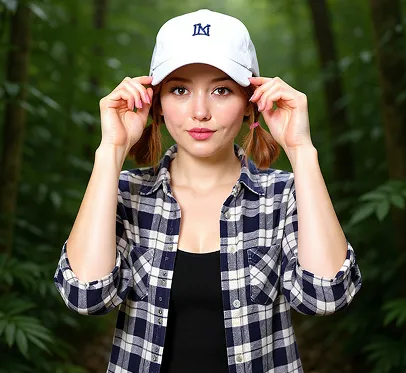
Editorial portrait created after a Grok Imagine 2.0 search
Editorial portrait

A stylized adult portrait without copying a living-person identity.

Prompt direction
Editorial portrait, wool coat, soft window light, 85mm look, no logos.
Expected output
A concept portrait for moodboards, not a celebrity clone.

Motion-ready frame from Grok Imagine 2.0 continuation workspace
Motion-ready frame

A 16:9 start frame for a later short clip.

Prompt direction
Coastal highway at dusk, wet asphalt reflections, 16:9 cinematic still.
Expected output
A start frame for image-to-video, not an Image 2 API demo.

Capabilities

What this Grok Imagine 2.0 page covers

Name the official still-image update, refuse to fake the API, and keep producing frames.

What Grok Imagine 2.0 refers to

xAI’s Imagine Image 2 news and grok.com/imagine cover a still-image model update. It is not Grok chat 2.0, not Video 1.5, and not SuperGrok Lite billing. Confirm features and release notes on official xAI pages before you quote them.

What this page can and cannot run

The workbench uses the Grok Imagine image model available on GrokImagineApp. If official Image 2 is only on grok.com or the xAI API, this site will not pretend to expose that checkpoint.

Related Grok versions

Need short video? Open Grok Imagine Video 1.5. Need a cheaper official plan? Open SuperGrok Lite. Need a $0 start? Open Grok Imagine free. One pain point per page.

Keep creating after the announcement

Paste the prompt you already trust, generate a still, then edit or animate. Credits, safety, and copyright still apply.

Workflow

How to use Grok Imagine 2.0 research here

Four steps from the announcement query to a generated still.

  1. Step 1

    Separate the product names

    Image 2.0 is a still-image update. Video 1.5 is a clip model. SuperGrok Lite is a plan. Open the matching page if you searched the wrong term.

  2. Step 2

    Check official availability if you need Image 2 itself

    Use x.ai news and grok.com/imagine for region, API, and plan gates. This workspace is independent.

  3. Step 3

    Generate a still here

    Write subject, lighting, and camera. Use Generate. Login and credits may be required.

  4. Step 4

    Continue the asset

    Edit the keeper still or send it to image-to-video. Do not treat this page as an Image 2 API console.

Decision

Official Image 2 vs this workspace

Use grok.com when you need native Image 2. Use this page when you need a still today.

FactorOfficial Grok ImagineThis workspace
What 2.0 isxAI Imagine Image 2 still-image model family.Explainer plus independent Grok Imagine stills available here.
Where it runsgrok.com/imagine, xAI news, and documented APIs.GrokImagineApp image workbench with counted credits.
Hard limitsxAI plan, region, safety, and API access.This site is not xAI and does not host unofficial Image 2 weights.

Use cases

Typical Grok Imagine 2.0 jobs

Announcement stills, prompt tests, and sending video searches to Video 1.5.

Announcement-day stills

A marketer heard Grok Imagine 2.0 launched and needs a campaign frame today. Generate with the workspace model, then swap to official Image 2 later if xAI access arrives.

Prompt tests before an API integration

A developer wants to see if a prompt holds up. Test composition here, then follow xAI docs for Image 2 API when that is the real requirement.

Wrong-term recovery

The query was grok imagine 2.0 but the job is video. Jump to Video 1.5 instead of forcing a still model page.

Limits

What this page does not offer

No unofficial Image 2 weights, no invented release dates.

  • This site is not xAI and does not claim to serve the Imagine Image 2 API.
  • Release-date and feature lists belong on official xAI pages, not invented here.
  • Credits, safety filters, and copyright still apply.
  • Do not treat this page as SuperGrok Lite, Video 1.5, or unlimited free Grok.

FAQ

Grok Imagine 2.0 questions

Product name, release date, API access, and Video 1.5 confusion.

What is Grok Imagine 2.0?

In 2026 search, it usually means xAI’s Imagine Image 2 still-image update. Confirm the live product name and access on x.ai and grok.com. This page explains the query and continues stills in an independent workspace.

When is Grok Imagine 2.0 release date?

Use xAI’s published news, not a third-party guess. This page will not invent a ship date. If grok.com already shows Image 2, that is the source of truth.

Does GrokImagineApp run Image 2.0?

No claim. The workbench runs the Grok Imagine image model offered here. Official Image 2 access stays with xAI.

Is Grok Imagine 2.0 the same as Video 1.5?

No. 2.0 in this article is a still-image line. Grok Imagine Video 1.5 is the image-to-video model page.

How do I keep creating after the 2.0 announcement?

Paste your prompt into the workbench above, generate a still, then edit or animate it. Credits apply. For native Image 2, use grok.com.

Continue

Generate the next still in this Grok Imagine 2.0 workspace.

Verwandte Artikel

Artikel und Updates zu Grok Imagine

Vergleichen Sie Limits, Modellqualität und Workflow-Optionen, bevor Sie den nächsten Grok Bild- oder Videoschritt wählen.