
Grok AI Image Generator

Grok Imagine demo
Session history
Images generated in this session will appear here.

Start here

What is a Grok AI Image Generator?

A Grok image generator turns text prompts into AI images. Use it for thumbnails, product concepts, ads, posters, and social posts. Free use depends on account credits, model, resolution, and plan settings.

Quick takeaways

  • Start from a written prompt when you do not have a source image yet.
  • Choose the model, aspect ratio, resolution, and quality before generating.
  • Review credits before higher-resolution or premium image generations.

What you can do

Create
New AI images from a written prompt
Use it for
Thumbnails, product concepts, ads, posters, and social posts
Best prompt
Subject, scene, style, lighting, format, and where the image will be used
Free to try
Available when your account has free credits or allowance
Last updated
July 7, 2026

Example outputs

Example outputs from Grok image prompts

Each example pairs a prompt direction with the expected output and the job it helps finish.

Prompt-to-image concept examples

Start with one written idea, then use the Grok image generator to test composition, mood, lighting, and format before you spend time on manual design.
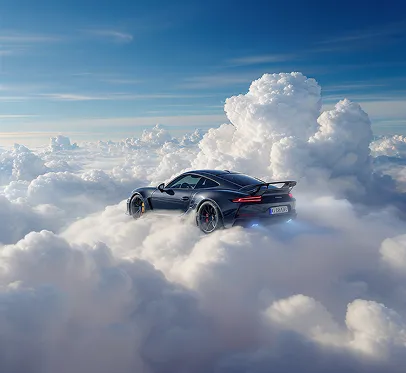
Suggested prompt direction for a product launch image
Product launch visual

Prompt a clean product scene, then refine the lighting and background for ads or landing pages.

Prompt
A premium black smart bottle on a glossy studio surface, warm rim light, minimal background, clean commercial photography.
Output
A square product ad draft for a landing page or paid social test.
Use case
Best for product launches, ecommerce tests, and ad concepts.
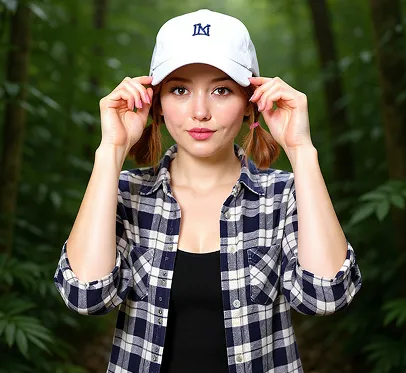
Suggested prompt direction for a creator thumbnail
Creator thumbnail

Generate a bold creator visual with face-safe composition, contrast, and social crop in mind.

Prompt
A cinematic creator thumbnail about AI image generation, bold center subject, dramatic studio lighting, high contrast.
Output
A high-contrast thumbnail direction for Shorts, Reels, TikTok, or X.
Use case
Best for video hooks, social posts, and creator campaigns.
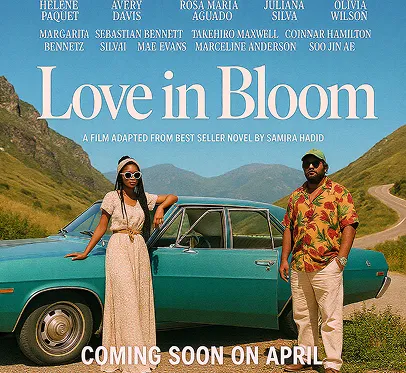
Suggested prompt direction for a campaign poster concept
Poster concept

Turn a plain campaign idea into a polished image direction for review and iteration.

Prompt
A futuristic city garden at sunrise, soft mist, reflective glass towers, editorial concept art, warm gold and teal palette.
Output
A moodboard-ready poster concept that can be refined in the editor.
Use case
Best for campaign drafts, concept boards, and creative reviews.

Why this tool

Why use a Grok image generator?

A Grok image generator is useful when the first task is not editing an existing file, but turning a written idea into a usable image draft quickly.

Built for prompt-first creation

The Grok AI image generator lets you start from a written prompt, choose output settings, and create a new image without needing a source photo.

Connected to the next creative step

After image generation, the same Grok workspace can support editing, history review, downloads, or image-to-video when a still image is ready for motion.

What it can do

Core features of the Grok AI image generator

The Grok image generator keeps prompt writing, model selection, image format, credit checks, and follow-up editing close together so creators can move from idea to asset.

Text-to-image prompt generation

Describe the subject, scene, style, camera angle, lighting, and output use. The Grok image generator turns that prompt into a new AI image draft without requiring a design file first.

Style and format control

Use the Grok AI image generator with square, portrait, landscape, or vertical formats and match the output to thumbnails, posts, ads, product visuals, or concept boards.

Reference-friendly workflow

When a plain text prompt is not enough, continue into the image editor with reference images so the generated direction can become a tighter image-to-image edit.

Credit-aware creation

See login, credit, model, quality, and resolution prompts before generation so you can understand when Grok image generation is free and when paid credits may be required.

How it works

How to generate images with Grok AI

The best Grok AI image generator results come from a prompt that says what the image should show, how it should look, and where it will be used.

  1. 1

    Write a specific image prompt

    Start with the subject, setting, style, lighting, composition, and where the image will be used. A clear prompt gives the Grok image generator more usable direction.

  2. 2

    Choose model and format settings

    Pick the available model, aspect ratio, resolution, and quality level that fit the output. Use vertical for social, square for thumbnails, and landscape for hero concepts.

  3. 3

    Generate and review the result

    Generate the image, check subject accuracy, text, hands, brand details, and visual safety before publishing. Save the best draft to history when you want to continue later.

  4. 4

    Refine, edit, or animate

    Regenerate with a tighter prompt, open the result in the Grok AI image editor, or send a strong still image into the image-to-video workflow for motion.

Prompt examples

Prompt examples for Grok image generation

Use these prompts as starting points, then adjust subject, style, lighting, crop, and output use for your own Grok image generator workflow.

Use caseStarting inputGeneration promptExpected result
Product ad conceptA short product idea and brand mood.A premium black smart bottle on a glossy studio surface, warm rim light, minimal background, clean commercial photography, square ad image.A product-style visual draft for landing pages, ads, or social tests.
Social thumbnailA creator topic or video hook.A cinematic creator thumbnail about AI image generation, bold center subject, dramatic neon studio lighting, high contrast, vertical crop.A high-contrast image direction for Shorts, Reels, TikTok, or X posts.
Concept art directionA scene idea, character, or campaign mood.A futuristic city garden at sunrise, soft mist, reflective glass towers, editorial concept art, warm gold and teal color palette.A moodboard-ready concept image that can be refined with image editing.

Use cases

Where Grok image generation fits best

Use this page when you need a new AI image first, then decide whether to edit, download, animate, or regenerate it.

Marketers testing campaign visuals

A marketer can start with a product, offer, and audience angle, generate several Grok image generator drafts, then pick the most promising image for an ad mockup or landing page hero.

Creators making thumbnails and posts

A creator can describe the video topic, emotion, color palette, and crop, then use the Grok AI image generator to create a thumbnail or social post image before editing details.

Founders exploring product concepts

A founder can turn a rough feature, app, packaging, or scene idea into quick image concepts, then share the strongest draft for feedback before commissioning final assets.

Value

What this Grok AI image generator helps you do

NeedHow it helps
Start from textUse a Grok image generator when you have an idea but no source image, layout, or design file yet.
Move faster than manual mockupsGenerate several visual directions quickly, compare them, then keep only the best draft for editing or publishing.
Control output formatChoose formats that match the channel before generation, instead of cropping an image after the subject is already misplaced.
Continue the workflowSend a good still image into the Grok AI image editor or Grok image-to-video workflow when the first image becomes the next creative asset.

Limits

Best inputs and realistic limits

LimitCheck before generatingWhat it meansRecommended action
Prompt quality mattersInclude 5 prompt fields: subject, scene, style, lighting, and output use.Short prompts can work, but stronger results usually describe subject, style, setting, lighting, format, and intended use.Add concrete details and remove conflicting style instructions before regenerating.
Generated details need reviewInspect faces, hands, logos, fine text, labels, and factual claims.Faces, hands, logos, fine text, product labels, and factual details can still need manual checking.Review every image before publishing, especially for ads, products, or client work.
Free access can depend on creditsCheck account credits, selected model, resolution, quality, and plan before generation.Grok image generation may be free to try when credits are available, but model, resolution, account, and plan settings can change what is free.Sign in, check the visible credit prompt, and review pricing before higher-cost generations.
Safety and rights rules still applyUse rights-cleared prompts and review copyright, privacy, impersonation, and platform rules.The tool does not remove legal, copyright, privacy, impersonation, or platform-safety obligations.Use rights-cleared prompts and avoid unsafe, deceptive, infringing, or non-consensual uses.

Related tools

Choose the next Grok image or video tool

Move between the core Grok Imagine workflows without hunting through articles or menus.

FAQ

Grok image generator FAQ

Direct answers about whether Grok can generate images, how to generate images with Grok AI, free access, editing differences, and commercial review.

Can Grok generate images?

Yes. This Grok image generator creates AI images from text prompts when image generation is available in the workspace. It is built for prompt-to-image creation, then lets you continue into editing, history, or image-to-video workflows.

How to generate images with Grok AI?

Write a clear prompt, choose the model and output format, then click generate. For better Grok AI image generator results, include the subject, scene, style, lighting, composition, and where the image will be used.

Is Grok image generation free?

Grok image generation is free to try only when your account has free credits or an active free allowance. Higher-resolution outputs, premium models, or exhausted credits may require paid credits, so check the visible credit prompt before generating.

What is the difference between a Grok image generator and a Grok image editor?

A Grok image generator starts from text and creates a new image. A Grok image editor starts from an existing image or generated draft and changes the background, style, subject details, or composition with a prompt.

Can I use generated Grok images commercially?

Commercial use depends on the terms of the tool, model provider, plan, prompt, and source material. Review rights, brand permissions, and platform rules before using generated images in ads, ecommerce, client work, or public campaigns.

Related articles

Articles & Updates About Grok Imagine

Compare limits, model quality, and workflow options before choosing the next Grok image or video step.

Ready to create an image?

Write a prompt and start generating Grok-style AI images online.